
In this module I responded to
Ennis Brinson:
http://ebrinsonlearningtheoryandedtech.blogspot.com/2012/05/module-6-post.html
and
David Miller
http://davidjmilleralf.blogspot.com/2012/05/module-6-learning-in-digital-world.html
Showing posts with label educ 8845. Show all posts
Showing posts with label educ 8845. Show all posts
Monday, May 21, 2012

Thursday, May 17, 2012
Module 6: My Philosophy
My Philosophy
When thinking about my teaching philosophy, I feel I work in the progressive and constructivist mindset. I look for ways for students to connect the facts and content I teach with their real-life experiences. I also want students to make sense of their own world through interactions with diverse individuals and resources. While I feel there are many uses of other learning theories like Behaviorism, I lean more towards the more modern theories. I know that students are coming to me with a vast knowledge of internet resources and can easily access content once reserved for memorization. I am moving towards a setting where I provide students with problems to solve instead of information to remember. If I can help them generate content for others I will be helping them contribute to society by adding to the knowledge base. As Siemens (2004) noted, students can easily access just about any piece of material through the use of nodes, such as the internet or through other individuals. I now teach students how to become better consumers of this instant information so they know if they are getting quality or worthless tidbits. I also serve in the role of guiding them to new information and stepping in to provide just-in-time information when their sources fail them.
I also feel there is a greater need for collaboration and communication between learners and instructors. Often, teachers are given a powerful role in which they are expected to just impart information upon the masses. In our information age, students and teachers would work better if they collaborated on what they know and not have a power struggle in the classroom. If teachers are leery of giving up control of their traditional classroom, they might explore having a virtual world which allows them to interact with their students. They could encourage less threatening interactions (e.g. students being scared to ask questions) through discussion postings or weekly/biweekly chats with their classes. I think if we moved to a more informal setting outside of school hours, students would be more apt to work in the formal nature of the classroom.
Reference
Wednesday, May 9, 2012
Module 5 Discussion: New Technologies
One of the greatest disappointments I have faced with technology implementation was with electronic grade books at my old school. Many teachers, especially those “veterans” who had been around a while were very apprehensive about switching to an electronic format. Although the new grade book program could cut down the amount of time needed to calculate averages, assign points to students, and other administrative tasks, many teachers wanted nothing to do with the program. Their tried and true methods of calculating grades using calculators and paper grade books, was sufficient...until the mandate came down that all grades had to be computed on-line, at least on a weekly basis.
Even after the mandate that grades had to be updated weekly and placed on-line, many teachers failed to complete these tasks. Some teachers took their old methods of calculating grades via calculators and just put one grade in the grade book, called “Average.” Other teachers tried to put grades in, according to the standards provided, and made a mess of it. Students ended up with averages greater than 100% (one had a 540% grade in a class) while others had all of their kids failing because of errors. While these were some of the extreme cases, we had a wide variety of successes and failures with the new system. Most of the concerns came from confusion about the program, persistent misconceptions on what tasks were necessary to complete, and a general lack of training.
One way of improving the roll-out of this program would be to incorporate Keller's ARCS model for instruction. ARCS stands for Attention, Relevance, Confidence, and Satisfaction. Driscoll (2005) mentioned that one way of gaining and sustaining attention is to take a novel approach in presenting the material. Instead of having the traditional staff development model where all teachers observed a “techie” showing off the software, a better approach might have been to divide groups up into skill levels. For schools, this is different because we usually focus on all-in-one training solutions. By analyzing the audience and splitting them up, we might be able to target weak areas of some participants while highlighting the more advanced features for technology-proficient teachers. Usually there is no middle ground in software training. Either users already know most of the material and are bored during the presentation or they are so under-prepared that they just shut down because of their feelings of being overwhelmed.
Another area where our initial trainings failed was the lack of relevance to teachers. We were told that we just had to do the grades on computer because that was the latest mandate. A better way to present this material would be highlighting how computerizing the grades would end up saving time at the end of terms, allow for greater flexibility in assigning points, and other features that are important to teachers.
A third area where our training was lacking was building confidence with teachers. As I noted above, some teachers were fully capable of integrating the new grade book program into their daily routines. However, other teachers lacked the most basic of technology skills required to use the program. The training provided assumed that all teachers had the necessary skills, which was not the case. For those teachers who lacked the skills, a set of tasks with increasing levels of difficulty might help teachers simultaneously build the confidence and skills for the integration of the grade book. There has to be a balance of an appropriate challenge to the skill set of the teachers in order to help build their self-efficacy along with enough assistance to help them meet challenging tasks. (Driscoll, 336).
Finally, there was a lack of positive reinforcement or consequences for using the on-line grade book. The only reinforcement teachers received was empty threats of what would happen if they did not comply with the policies about putting grades on line. What lacked was a way for learners to see what happens when they put the grades on line. When struggling teachers learned that the grade book was not their enemy, they found that they indeed did save time in inputting their grades. However, there was such a challenge to get the teachers to this point, that the “reward” was nowhere worth the effort or struggle. According to Driscoll (2005), Keller’s model suggested ways to generate satisfaction when natural consequences did not exist. This would include verbal praise, recognition, or awards to those who complied. By offering some sort of positive reinforcement, teachers might be more likely to embrace the grade book compared to being threatened with disciplinary action for non-compliance.
Even after the mandate that grades had to be updated weekly and placed on-line, many teachers failed to complete these tasks. Some teachers took their old methods of calculating grades via calculators and just put one grade in the grade book, called “Average.” Other teachers tried to put grades in, according to the standards provided, and made a mess of it. Students ended up with averages greater than 100% (one had a 540% grade in a class) while others had all of their kids failing because of errors. While these were some of the extreme cases, we had a wide variety of successes and failures with the new system. Most of the concerns came from confusion about the program, persistent misconceptions on what tasks were necessary to complete, and a general lack of training.
One way of improving the roll-out of this program would be to incorporate Keller's ARCS model for instruction. ARCS stands for Attention, Relevance, Confidence, and Satisfaction. Driscoll (2005) mentioned that one way of gaining and sustaining attention is to take a novel approach in presenting the material. Instead of having the traditional staff development model where all teachers observed a “techie” showing off the software, a better approach might have been to divide groups up into skill levels. For schools, this is different because we usually focus on all-in-one training solutions. By analyzing the audience and splitting them up, we might be able to target weak areas of some participants while highlighting the more advanced features for technology-proficient teachers. Usually there is no middle ground in software training. Either users already know most of the material and are bored during the presentation or they are so under-prepared that they just shut down because of their feelings of being overwhelmed.
Another area where our initial trainings failed was the lack of relevance to teachers. We were told that we just had to do the grades on computer because that was the latest mandate. A better way to present this material would be highlighting how computerizing the grades would end up saving time at the end of terms, allow for greater flexibility in assigning points, and other features that are important to teachers.
A third area where our training was lacking was building confidence with teachers. As I noted above, some teachers were fully capable of integrating the new grade book program into their daily routines. However, other teachers lacked the most basic of technology skills required to use the program. The training provided assumed that all teachers had the necessary skills, which was not the case. For those teachers who lacked the skills, a set of tasks with increasing levels of difficulty might help teachers simultaneously build the confidence and skills for the integration of the grade book. There has to be a balance of an appropriate challenge to the skill set of the teachers in order to help build their self-efficacy along with enough assistance to help them meet challenging tasks. (Driscoll, 336).
Finally, there was a lack of positive reinforcement or consequences for using the on-line grade book. The only reinforcement teachers received was empty threats of what would happen if they did not comply with the policies about putting grades on line. What lacked was a way for learners to see what happens when they put the grades on line. When struggling teachers learned that the grade book was not their enemy, they found that they indeed did save time in inputting their grades. However, there was such a challenge to get the teachers to this point, that the “reward” was nowhere worth the effort or struggle. According to Driscoll (2005), Keller’s model suggested ways to generate satisfaction when natural consequences did not exist. This would include verbal praise, recognition, or awards to those who complied. By offering some sort of positive reinforcement, teachers might be more likely to embrace the grade book compared to being threatened with disciplinary action for non-compliance.
Reference
Wednesday, April 25, 2012
Module 4 Posting
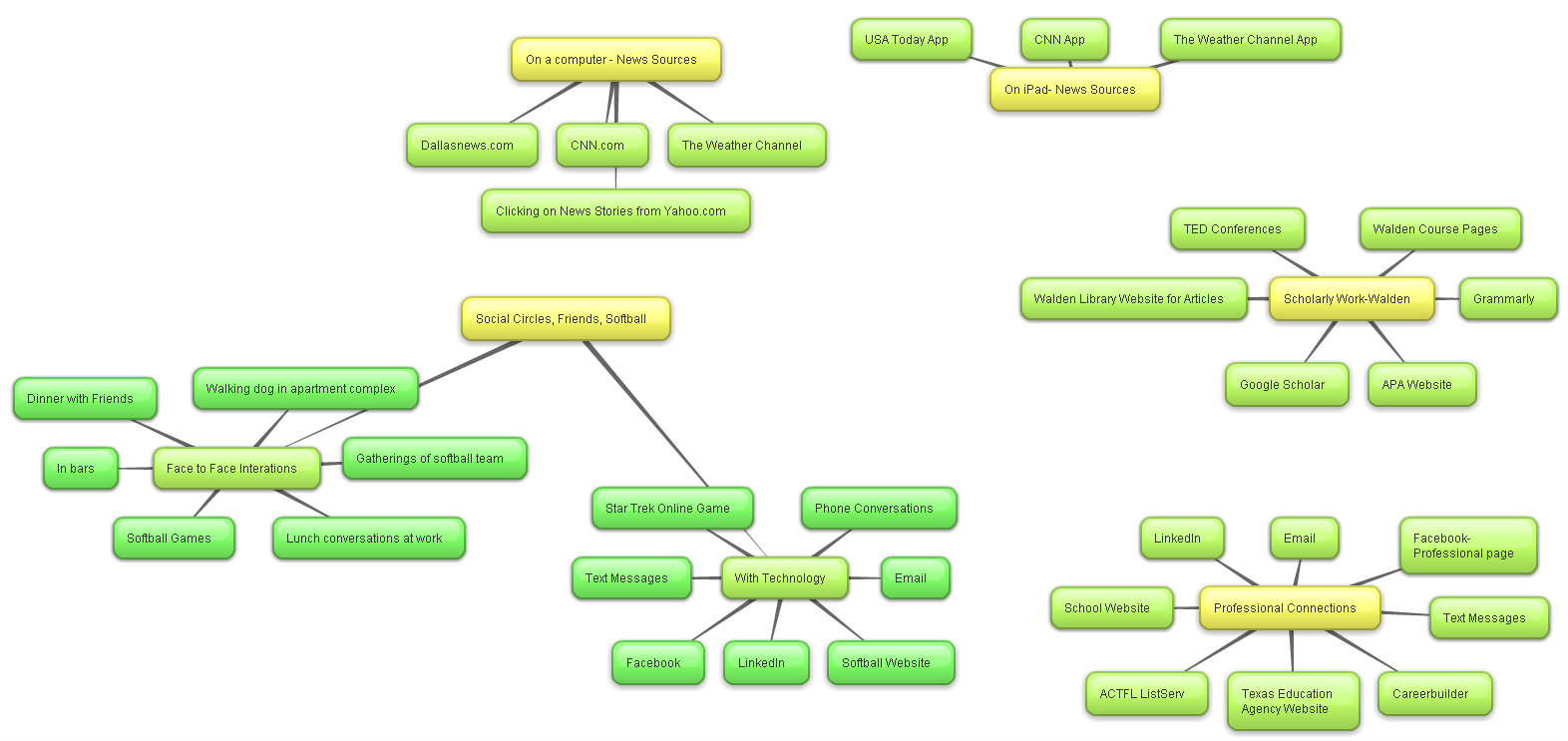 As we learned in this module, individuals form connections to acquire information from a variety of sources. The ways individuals connect to these networks of information are as unique as the individual. If you were to compare my network of connections to that of a younger or older person, or someone without technology in their lives, you would see vast differences. To complete my mindmap of how I connect to networks, I divided my life into my main uses of time: Social, professional, scholarly (or my work at Walden), news sources while on a computer, and news sources while on my iPad. Since the original mindmap is quite large, I cropped the main sections so they would fit better for this format. If you would like the original file of all of these areas, please click here Large MindMap.
 One of the main ways I spend my time at work and at home is looking at the current news. I look for local stories, national news, and sometimes international news of places I am interested in (e.g. Spain, Argentina, France, etc.). I stopped watching television news about five years ago due to the often obvious slant on many news stories. Some news networks were clearly providing a liberal spin while others had very conservative views. I never felt like I was getting the whole story without bias or sensationalization. Take the current news of Trayvon Martin and George Zimmerman, for example. The media has put a spin on the story either by creative editing, showing pictures that are deliberately old, or presenting pictures that just are not the individuals. I lost trust in many of the news outlets due to their reporting skills and lack of relevant news (e.g. The Kardashian wedding), so I search on my own for information about stories of interest to me. The sources I use for my news fix while on a computer are Dallasnews.com, CNN.com, links from Yahoo.com's news section, and the Weather Channel. While each source may have weaknesses, the combination of these helps me form a balanced view of local, national and international news.
 When I don't have access to a traditional computer, I use my iPad to access news. I have downloaded the USA Today, CNN.com, and Weather Channel apps to get my news when I don't want to visit traditional web sites. I don't read the USA Today web site, but found that I enjoy the app because it allows me to view sections such as travel, world, sports, and money without having to search for specific items on a web site. The apps for the CNN and the Weather Channel also provide an intuitive layout for the news I seek. I can get just what I want, when I want it, without having to put forth a lot of effort through searching, typing, etc.
 I have more variety in my connections with professional content. As a Spanish teacher, I work with a department of 4 other teachers and we connect via email, text messages, and in person. We often discuss lesson plans, student progress, and ideas for how to teach difficult content. One teacher and I also use Facebook to connect with each other and with our students. Don't worry, this Facebook page is just school-related and only is used to inform students of assignments, offer teacherly advice, etc. I also access content from the Texas Education Agengy website for help with connecting my content to the content knowledge and skills required by the state. I am a member of various listservs where other teachers connect for ideas and share how they teach. My school website offers me information about schedules, testing events, and other daily operations knowledge I need as a teacher. Finally, I am looking for a new career that combines my passion for teaching with corporate training or travel. To that end, I am becoming more connected to sites like LinkedIn and Careerbuilder. I am trying to connect with employers that have the desired jobs I seek.
 The largest amount of diversity in my connections comes with my social group. With a unique group of friends and family members, I cannot just use one or two methods of communication or connection. For example, with my mother, I might use the phone to call her, text her, send her messages on Facebook, or have a face to face interaction. With a specific friend, Jenifer, I only text her now because we no longer work together. We rarely connect using phone coversations or have lunch like I do with my colleagues. I keep abreast of her life events (e.g. having a baby, moving, looking for a job) via Facebook and sometimes send her funny pictures via SMS messages.
 Finally, my scholarly work with Walden has me connecting with mostly scholarly sites such as the Walden Library or the course pages for each of our classes. Sure, I often go to other sites which have the resources or required readings, but when I map out how I access content, I usually go straight to the Walden site, access my couse information, and then seek out the resources via the library. Something I noticed that is quite different is that I do not use the phone, text messages, or Facebook when seeking out information. I do not socialize with most of the colleagues at Walden because I never seem to have the same people in my classes. Often times, I feel we are stressed trying to get the work done that we do not participate in the social aspect you might find in a face to face class. Sure, I see some people from time to time in classes, but I usually do not recognize names and do not make a concerted effort to mingle outside of the classroom.
So, how has my network changed the way I learn?--Well, in the past, I was reliant on newspapers and televised newscasts to get information pertinent to my local area. Sometimes there were national and international stories, but not as often. I had to get snippets of news that could fit into 30-60 minute broadcasts and did not go in-depth into the issues. Now, with my network of websites both on the computer and iPad, I can find stories of interest to me and if I choose, dig deeper by searching on the internet. With formal learning, I have a greater access of scholarly journals where I can draw information. By having websites that compile all of the literature I need, I no longer spend hours looking for sources, I spend seconds or mere minutes. I have gotten efficient at finding what I need, skimming the content for applicability, and storing the information for future use. This comes at little or no expense, which is much different from the days of microfiche and copies that I could not afford.
What tools work best for me?--The digitial tools that work best for me are my iPad and my home computer. The iPad provides all of the tools I need to connect with others. I can chat, send messages, search for news, access coursework, and just about anything I need to acquire knowledge, without being tethered to a computer. If I go outside and see something I don't know about (say a scary looking spider), I can immediately look up information and know if I need to run or just ignore it. With the computer though, I can generate content based on what I searched for. I use the traditional computer to apply, synthesize, and create material to make the content more meaningful for me.
How do I seek new knowledge?--I make no excuses, but when I want to find out information about a topic, I do a Google or Yahoo search. Based on the results presented, and avoiding the paid placements, I find the information I need, or look deeper. Two days ago a colleague mentioned the dangers of High Fructose Corn Syrup and that "research has shown...." As soon as I hear, "research has shown," I get suspiscious and look up relevant information so that I can judge for myself the merits of the argument. All of this investigation starts with a simple search engine query.
I also do the same for some of my work at Walden. If presented with a learning theory I know little about, the first thing I do is look it up for a summary. Then, based on the little bit of information I found, I continue to look for more sources, including from our library website. Sure, Wikipedia comes up, but I use it only to give me some basic knowledge before I try to get a deeper understanding.
Ray
Wednesday, March 28, 2012
Evolution of educational theory isms
Module 2 Blog Posting
While the idea of evolution of the human species might not appeal to certain populations, the idea that ideas or people evolve from earlier versions of themselves holds some truth. We have seen sports and athletes evolve over the years and records smashed as technology and athleticism improve. The same evolution process has occurred with the learning theories proposed over the year. No matter who you think is the mother or father of a learning theory or how well you think it explains learning, future theories evolve from these foundations. These foundation theories drop seeds that get planted and grow into other theories.As Kerr (2007) noted, the different –isms that populate textbooks on learning theory do not stand still. And while these ideas might have different bits and pieces that we disagree with, each idea does have merit and deserves consideration. A good thing about the variety of these learning theories is that it makes sense that we all do not learn the same way. Since individuals come from all different backgrounds with distinct experiences, how can we say that Behaviorism or Cognitivism is the best explanation for how these individuals learn? If Cognitive Information Processing (CIP) is mainly focused on memory, is it possible to believe that those with memory issues cannot learn?
I think Kapp (2007) summed it up best when he stated we should take bits and pieces from each of the learning theories. As they evolve, we pick the strongest bits and get rid of those which are inadequate for explaining how we learn. As we noted in a class discussion, we cannot get to Connectivism if students are not versed in how to make connections with nodes of information. We have to teach them the skills on how to get that knowledge. This teaching could take on a Behaviorist approach where learners are given a stimulus (problem to solve) and choose the best tool, technology or otherwise, and then are provided with the response to either strengthen that behavior or to weaken wrong choices. We help these same students with memory skills through dual coding of lessons, providing practice, and helping them store knowledge in their long term memory. These steps are not the functions of the main idea, Connectivism, but we use stepping stones of other learning theories to get to those which best help us solve educational problems we face.
Kerr, B. (2007, January 1). _isms as filter, not blinker [Web log post]. Retrieved from http://billkerr2.blogspot.com/2007/01/isms-as-filter-not-blinker.html
Kapp, K. (2007, January 2). Out and about: Discussion on educational schools of thought [Web log post]. Retrieved from http://www.kaplaneduneering.com/kappnotes/index.php/2007/01/out-and-about-discussion-on-educational/
Friday, March 16, 2012
Module 1 Repsonses
This week I responded to Melinda and Sherri's postings.
Melinda's Blog:
Sherri's Blog:
Melinda's Blog:
Sherri's Blog:
Wednesday, March 14, 2012
EDUC 8845 Module 1 Post
When looking at how education has progressed over the years we can see how the internet has allowed for different styles of teaching. Long gone are the days of large group lectures and proctored exams where students had to physically show up to school. The digital classroom allows for students and teachers to play different roles than they used to play in the past. Instead of being a passive recipient of knowledge, the learner is often empowered to seek out knowledge and connect it with their experience. Even in the traditional classroom these changes of roles are becoming more evident.
 Siemens (2008) identified five metaphors that other scholars labeled that explain the emerging roles of educators. He noted the following:
Educator as Master Artist: The educator affords an open and sharing workspace where learners observe the work of others. The educator also provides guidance to the learners by highlighting innovate/creative work of the learners’ peers.
Educator as Network Administrator: The educator connects the learners’ current knowledge and skills with areas in which the learners are novices. This knowledge base is connected to the outcomes of the course or job skills taught. The educator teaches learners how to critically evaluate information sources as to how it will help the learner accomplish the stated goals for their course or job.
Educator as Concierge: The educator provides resources and information to learners that the learner may not have known existed. As the educator has more experience in the field, he/she would know where to find pertinent information for the learners. The educator also provides background information as needed to enhance the resources provided.
Educator as Curator: The educator has a greater knowledge about their content area and provides this knowledge to learners by providing a map of sorts to the concepts taught. The educator does not just set the learner free on a road to discovery, but provides resources that would help guide the learner down their path.
The Instructivist/Constructivist: The educator focuses on having the learner make connections in their learning. This approach blends the four prior metaphors of educators: master artist, network administrator, concierge, and curator.
 When analyzing each of these metaphors, I see each of them having a place in the digital classroom. For example, in our Walden classes we are always reading the work of our peers while crafting our own work. We assimilate what we learn from the writing of others and add that knowledge to our own. Our professors often mention exemplars of work and post those for us to review. The network administrator metaphor is also valid in that our professors help provide connections to areas in which our skills are not as strong. For example, I struggled with APA form for a while and my previous instructors not only taught me how to improve the skill but how the knowledge was beneficial for the bigger picture. The idea of the educator as a concierge is beneficial for students who need guidance on where to find learning opportunities. While students of the digital age might know certain sources of information (e.g. Google, Wikipedia, etc.), they also need exposure to better sources and places they can learn without just search engines. As concierges, educators can provide a better list of resources that are worthy of review and steer students clear of the “tourist traps” that offer little or no substance.
 I think the educator as curator is a better metaphor for how I like to be taught and how I often teach. Many of our learners are digitally minded as they have been learning with technology just about all of their lives. Sometimes these students just want to be given a task and some basic guidance on the topic. The students want to be able to do work on their own and not be throttled by slow teachers or peers. Instead of working on a prescribed task everyone has to do, they want to go out and do something that matches their strengths and weaknesses. Through this process, the students would fill in the gaps of their knowledge with their searches and application of technology. That said, some teachers take the curator approach too far and just give an assignment and expect students to do all the rest without any help.
 When I think of the best instructors in digital learning, I see superheroes. In order for online learning to be effective, especially for new students in this environment, instructors have to fulfill all of the roles Siemens (2008) mentioned. Instructors must individualize instruction for the distinct needs of the learners and cannot offer a cookie-cutter approach to their teaching. The reason I say superhero is that this is often hard to accomplish. Instructors cannot read minds or guess how students learn best, but are expected to tailor lessons for all. They have to not only master technology tools used in class, but also scour the land for resources that would benefit their classes. With twenty students in class, this could take inordinate amounts of time…and if they teach more than one section of a class, or topic…how could they do it all? With super powers, of course.
Reference:
Siemens, G. (2008). Learning and knowing in networks: Changing roles for educators and designers. Retrieved from http://it.coe.uga.edu/itforum/Paper105/Siemens.pdf

Educator as Master Artist: The educator affords an open and sharing workspace where learners observe the work of others. The educator also provides guidance to the learners by highlighting innovate/creative work of the learners’ peers.
Educator as Network Administrator: The educator connects the learners’ current knowledge and skills with areas in which the learners are novices. This knowledge base is connected to the outcomes of the course or job skills taught. The educator teaches learners how to critically evaluate information sources as to how it will help the learner accomplish the stated goals for their course or job.
Educator as Concierge: The educator provides resources and information to learners that the learner may not have known existed. As the educator has more experience in the field, he/she would know where to find pertinent information for the learners. The educator also provides background information as needed to enhance the resources provided.
Educator as Curator: The educator has a greater knowledge about their content area and provides this knowledge to learners by providing a map of sorts to the concepts taught. The educator does not just set the learner free on a road to discovery, but provides resources that would help guide the learner down their path.
The Instructivist/Constructivist: The educator focuses on having the learner make connections in their learning. This approach blends the four prior metaphors of educators: master artist, network administrator, concierge, and curator.


Reference:
Siemens, G. (2008). Learning and knowing in networks: Changing roles for educators and designers. Retrieved from http://it.coe.uga.edu/itforum/Paper105/Siemens.pdf
Subscribe to:
Posts (Atom)